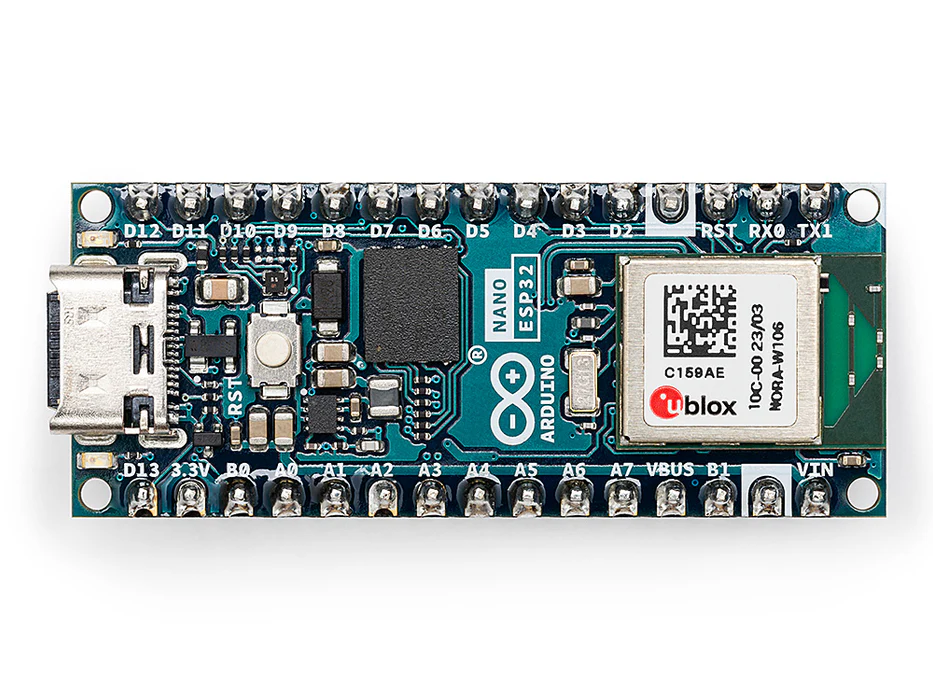



Arduino® Nano ESP32 with headers
The new member to our iconic Nano family, the Nano ESP32. This board brings all the power of the well-known ESP32-S3 with the full support of the Arduino ecosystem, allowing makers to explore the world of Arduino and MicroPython without any blocker. Just unleash your creativity and start building for the next IoT project.
Overview
Introducing the Nano ESP32, a powerful addition to the Arduino ecosystem that brings the popular ESP32-S3 to the world of Arduino and MicroPython programming. Whether you're a beginner stepping into the world of IoT or MicroPython, or an advanced user looking to incorporate it into your next product, the Nano ESP32 is the perfect choice. It covers all your needs to kick-start your IoT or MicroPython project with ease.
Let's explore the key features of the Nano ESP32:
- Tiny footprint: Designed with the well-known Nano form factor in mind, this board's compact size makes it perfect for embedding in standalone projects.
- Wi-Fi® and Bluetooth®: Harness the power of the ESP32-S3 microcontroller, well-known in the IoT realm, with full Arduino support for wireless and Bluetooth® connectivity.
- Arduino and MicroPython support: Seamlessly switch between Arduino and MicroPython programming with a few simple steps. We even offer an introductory course for those new to the MicroPython world, find more information in the documentation page.
- Arduino IoT Cloud compatible: Quickly and easily create IoT projects with just a few lines of code. Our setup takes care of security, allowing you to monitor and control your project from anywhere using the Arduino IoT Cloud app. (Available starting August 2023)
- HID support: Emulate human interface devices, such as keyboards or mice, over USB, opening up new possibilities for interacting with your computer.
There are no more excuses to delay your exploration of IoT and MicroPython. The Nano ESP32 provides everything you need to start creating and discovering the endless possibilities.
Arduino IoT Cloud Compatible*
Tech Specs
| Board | Name | Arduino® Nano ESP32 with headers |
| SKU | ABX00083 | |
| Microcontroller | u-blox® NORA-W106 (ESP32-S3) | |
| USB connector | USB-C® | |
| Pins | Built-in LED Pin | 13 |
| Built-in RGB LED pins | 14-16 | |
| Digital I/O Pins | 14 | |
| Analog input pins | 8 | |
| PWM pins | 5 | |
| External interrupts | All digital pins | |
| Connectivity | Wi-Fi® | u-blox® NORA-W106 (ESP32-S3) |
| Bluetooth® | u-blox® NORA-W106 (ESP32-S3) | |
| Communication | UART | 2x |
| I2C | 1x, A4 (SDA), A5 (SCL) | |
| SPI | D11 (COPI), D12 (CIPO), D13 (SCK). Use any GPIO for Chip Select (CS) | |
| Power | I/O Voltage | 3.3 V |
| Input voltage (nominal) | 6-21 V | |
| Source Current per I/O Pin | 40 mA | |
| Sink Current per I/O Pin | 28 mA | |
| Clock speed | Processor | up to 240 MHz |
| Memory | ROM | 384 kB |
| SRAM | 512 kB | |
| External Flash | 128 Mbit (16 MB) | |
| RAM | 8MB (NORA-W106-10B) | |
| Dimensions | Width | 18 mm |
| Length | 45 mm | |
Conformities
Resources for Safety and Products
Manufacturer Information
The production information includes the address and related details of the product manufacturer.
Arduino S.r.l.
Via Andrea Appiani, 25
Monza, MB, IT, 20900
https://www.arduino.cc/
Responsible Person in the EU
An EU-based economic operator who ensures the product's compliance with the required regulations.
Arduino S.r.l.
Via Andrea Appiani, 25
Monza, MB, IT, 20900
Phone: +39 0113157477
Email: support@arduino.cc
Learn More
Learn MicroPython with the best board: the Arduino Nano ESP32. Check the free MicroPython 101 course here!
Get Inspired
FAQs
Is the Nano ESP32 compatible with MicroPython?
Absolutely! This board fully supports MicroPython. For detailed information on setting it up and getting started with MicroPython, please visit docs.arduino.cc/nano-esp32.
How can I power the Nano ESP32?
The Nano ESP32 can be powered in two ways. Firstly, you can power it via the USB port, which activates the VBUS pin as an output. Alternatively, you can supply power through the VIN pin, accepting an input voltage range of 5 to 18 Volts.
Does it use the official ESP32 core?
Yes, if you are an ESP32 user, simply install the latest version of the Arduino Nano ESP32 core through the board manager in the Arduino IDE. For more information, please refer to the official documentation page.
Will the Nano ESP32 be compatible with sketches from generic ESP32 boards?
The Arduino Nano ESP32 can run code written for other ESP32 devices without any fuss. It's designed to be fully compatible with the ESP32 ecosystem, making it easy to port existing code.


